Approval workflows
Vendoro routes every requisition and invoice through approval chains you set by location, category and amount, with an extra step when an order would go over budget. Approvers work from one page, in bulk if they like, or approve from a signed email link or a text alert. Out-of-office cover moves waiting approvals to a named person.
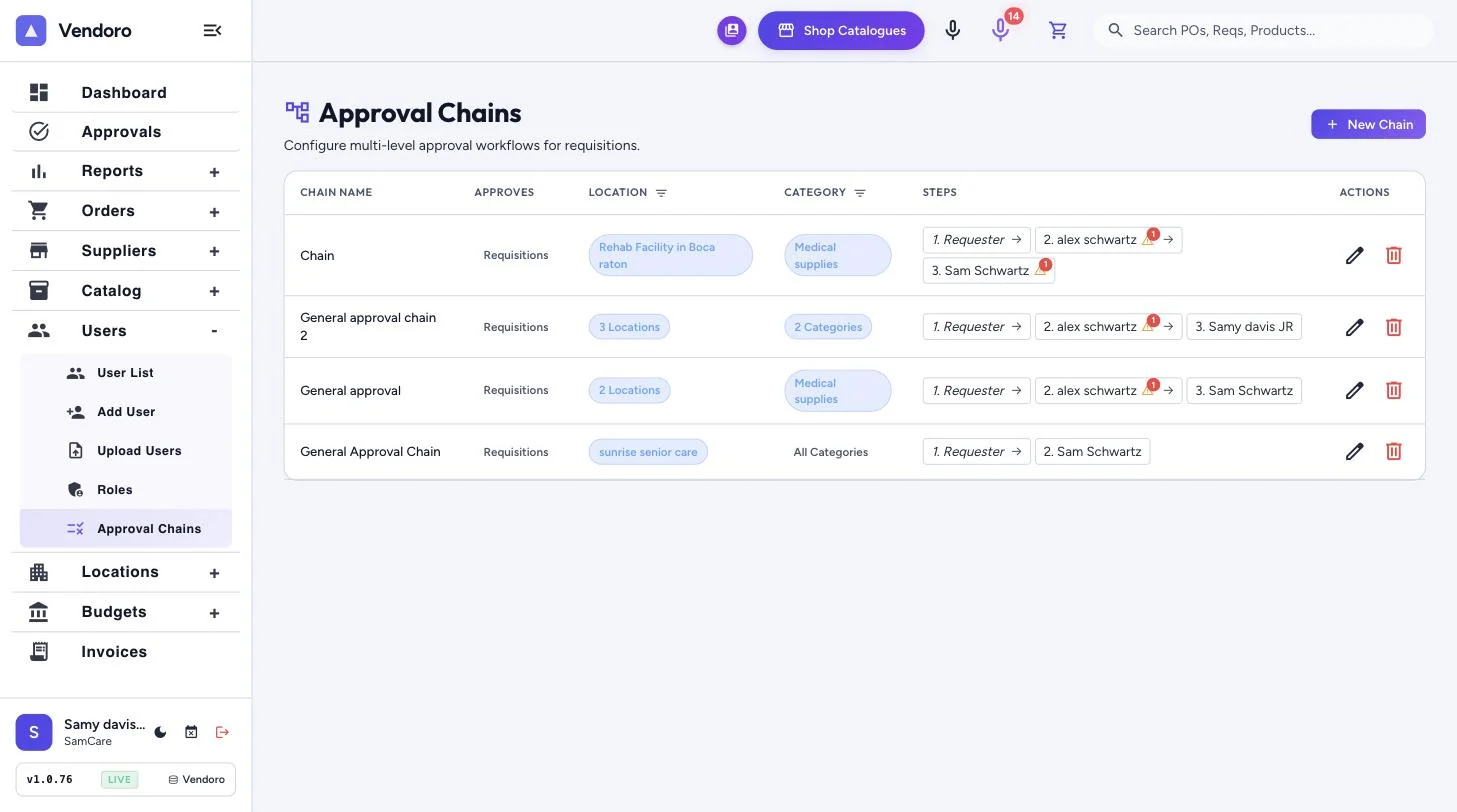
How approvals work
| Feature | What it does |
|---|---|
| Approval chains | Steps such as Requester → regional director → CFO, set per location and category, with amount thresholds |
| Over-budget step | Orders that would take a location over budget go to a named approver |
| Requisitions and invoices | Separate chains for each |
| Approvals page | Waiting for me and waiting on others, days waited, bulk approve, and a details panel with the budget effect |
| Email and SMS | Signed, expiring approval links by email, and text alerts |
| Out of office | Name your dates and a cover; waiting approvals move to them |
Frequently asked questions
Does an over-budget warning block the order?
No. Staff see the warning before sending; if the chain has an over-budget step, the order goes to that approver.
Can invoices approve themselves?
Only clean matches under a limit you set: matched to the order and receipt within tolerance, on a live order, with a GL account on every line.
Do approvers need to sign in?
Not for email approvals: the links are signed and expire.