The dashboard and budget emails
What the dashboard shows, and the morning email for budgets running high.
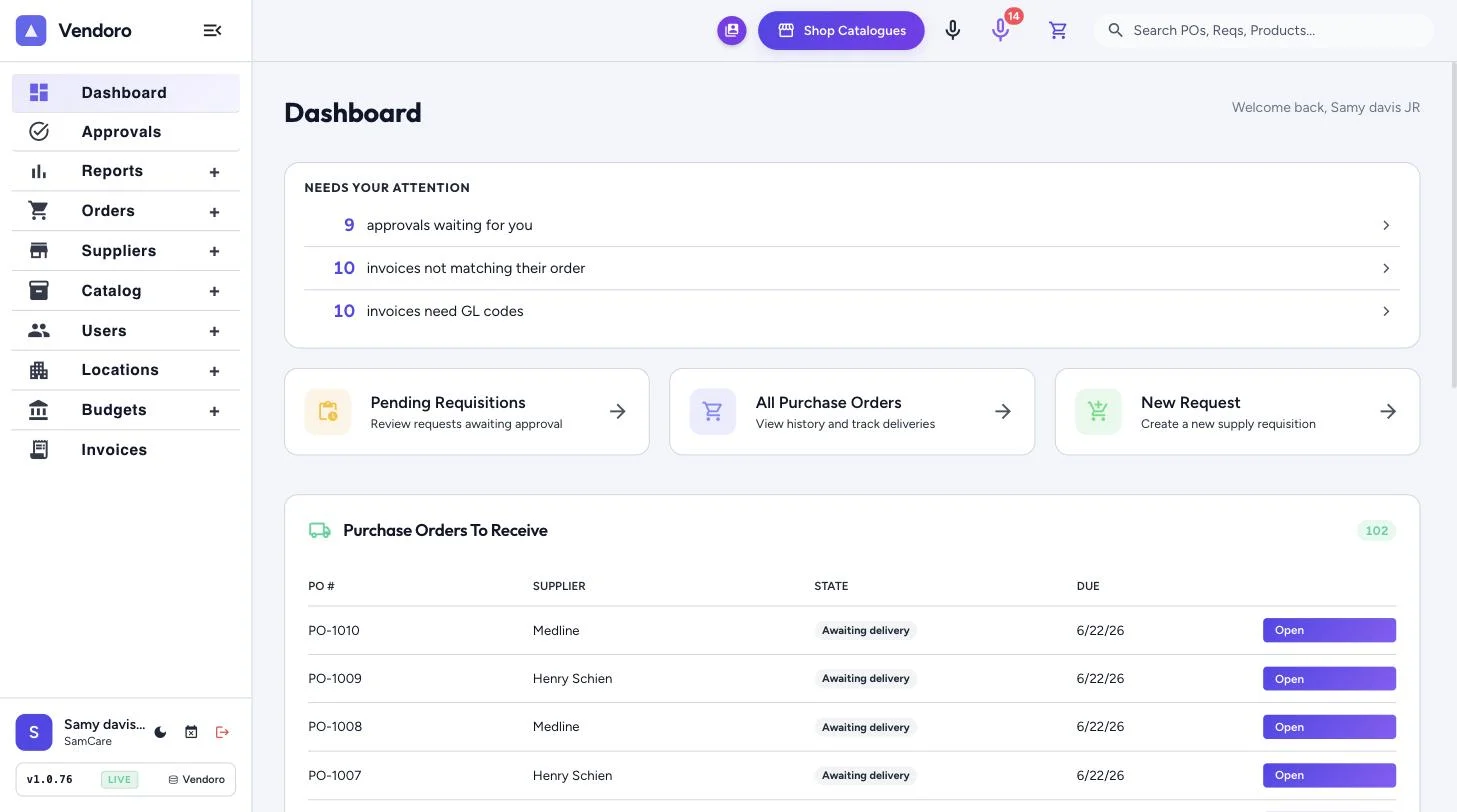
On the dashboard
- Needs your attention: requisition approvals waiting for you, invoices waiting for your approval and, when there are any, approvals overdue across the team, invoices past due to pay, invoices returned to you, invoices not matching their order, invoices that need GL codes, vendor replies to read and approved invoices ready to export. You see only the lines your rights cover. Each line opens the Requisitions or Invoices page, already filtered. The two “waiting for you” lines show only what is waiting on you, the same items the line counted. There is no separate approvals inbox.
- Shortcuts: Pending Requisitions, All Purchase Orders and New Request.
- Purchase Orders To Receive: POs awaiting delivery, with a link to everything waiting to be received.
- Weekly Budget: pick a location and category, week to date or month to date, in dollars or PPD. Weeks and months follow your company’s time zone, and each week runs from the Weeks Start On day set in your budgets.
- Spend Breakdown: spend by category for the week or month to date.
The morning budget email
Tick Email me each weekday morning when a budget reaches 90% on the budget card. From 7am on weekdays, in your company’s time zone, you get the budgets at your locations that are at 90% or more, counting approved and pending spend, for the whole location and for each category with its own amount. No email is sent on days when nothing is close.